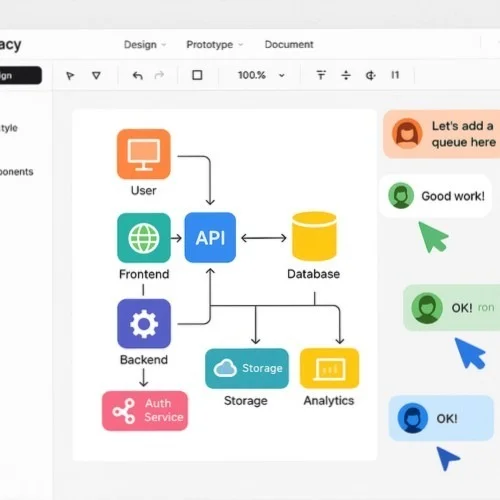
Tech stack diagram creation made simple with Lunacy's free software

Build clear, compelling technology stack visualizations using Lunacy - a powerful yet completely FREE vector tool. Ideal for developers, architects, plus tech teams looking to communicate complex system architecture through professional tech stack diagrams.

Tech Stack Diagram Creator in Lunacy

How to create tech stack diagrams with Lunacy

Step 1

Set up your diagram structure

Select from built-in tech diagram templates or establish a custom layout utilizing Lunacy's professional vector tools along with shape libraries.

Step 2

Add technology components

Leverage Lunacy's extensive icon library to incorporate technology icons, establish connection flows, plus label various stack elements through customizable text options.

Step 3

Export and share your diagram

Export tech stack visualization in multiple formats or share directly with colleagues through Lunacy's cloud collaboration features.

Powerful diagram creation tools

Craft precise tech stack diagrams utilizing Lunacy's comprehensive vector editing capabilities. Implement auto-layout for perfectly aligned elements, Boolean operations to build custom shapes, plus smart connectors to illustrate relationships between technologies. These precision tools ensure all tech stack visualizations maintain accuracy while looking professionally polished.

Tech stack diagram tools in Lunacy

Built-in technology icon library

Access thousands of technology icons directly within Lunacy to represent every element in a tech stack. Find symbols for programming languages, frameworks, databases, cloud services, plus infrastructure components without leaving the app. Develop professional tech stack diagrams faster thanks to ready-to-use visual assets covering all modern technologies.

Technology icon library in Lunacy

Team collaboration and sharing

Work alongside developers plus stakeholders in real-time on tech stack diagrams. Lunacy's cloud features enable seamless teamwork regardless of operating system preferences. Share technology architecture visualizations instantly, gather feedback via comments, while maintaining documentation consistency throughout entire development teams.

Collaborative tech stack diagramming

More powerful features for tech stack visualization

Component system for reusable elements

Establish reusable components to represent frequently used technology elements in stack diagrams. Update a component once to automatically refresh all instances throughout a diagram, ensuring consistency while saving time when documenting complex technology architectures.

Cross-platform compatibility

Build tech stack diagrams on Windows, macOS, or Linux thanks to Lunacy's cross-platform support. Share plus collaborate on technology visualizations regardless of team operating system preferences, making it ideal for diverse development groups.

Prototype interactive diagrams

Transform static tech stack diagrams into interactive prototypes that showcase system workflows. Add clickable areas to display detailed information about each technology component, craft hover states providing additional context, plus develop interactive documentation for improved understanding.

Frequently asked questions about tech stack diagrams

What developers say about creating tech stack diagrams with Lunacy

Join thousands of developers documenting their technology architecture with our free software.
  • I've tried numerous diagramming solutions for documenting our tech stack, but Lunacy became our team standard. The vector precision paired with built-in tech icon library saves us countless hours. Being able to craft components for common elements in our microservice architecture means we maintain consistent documentation across all systems. The fact that it's completely free is simply remarkable.

    Michael D., Lead Developer
  • Lunacy transformed how we document our technology architecture. The ability to produce detailed, professional tech stack diagrams without subscription costs has been invaluable for our startup. I particularly appreciate cross-platform support since our team uses various operating systems. The real-time collaboration feature has made architecture reviews significantly more productive.

    Priya S., Software Architect
  • Building infrastructure diagrams in Lunacy has simplified our deployment documentation process. The precision tools coupled with built-in icon library allow me to produce clear visualizations of cloud architecture that both technical plus non-technical stakeholders understand. Being able to export in multiple formats means I include these tech stack diagrams in wikis, presentations, as well as technical documentation.

    Thomas K., DevOps Engineer